一、司机端
学习目标:
- 完成司机端微信授权登录与获取司机登录信息
- 掌握腾讯云对象存储COS
- 掌握腾讯云OCR,识别身份证与驾驶证
- 完成司机认证功能
- 掌握司机腾讯云人脸识别技术
1、司机登录
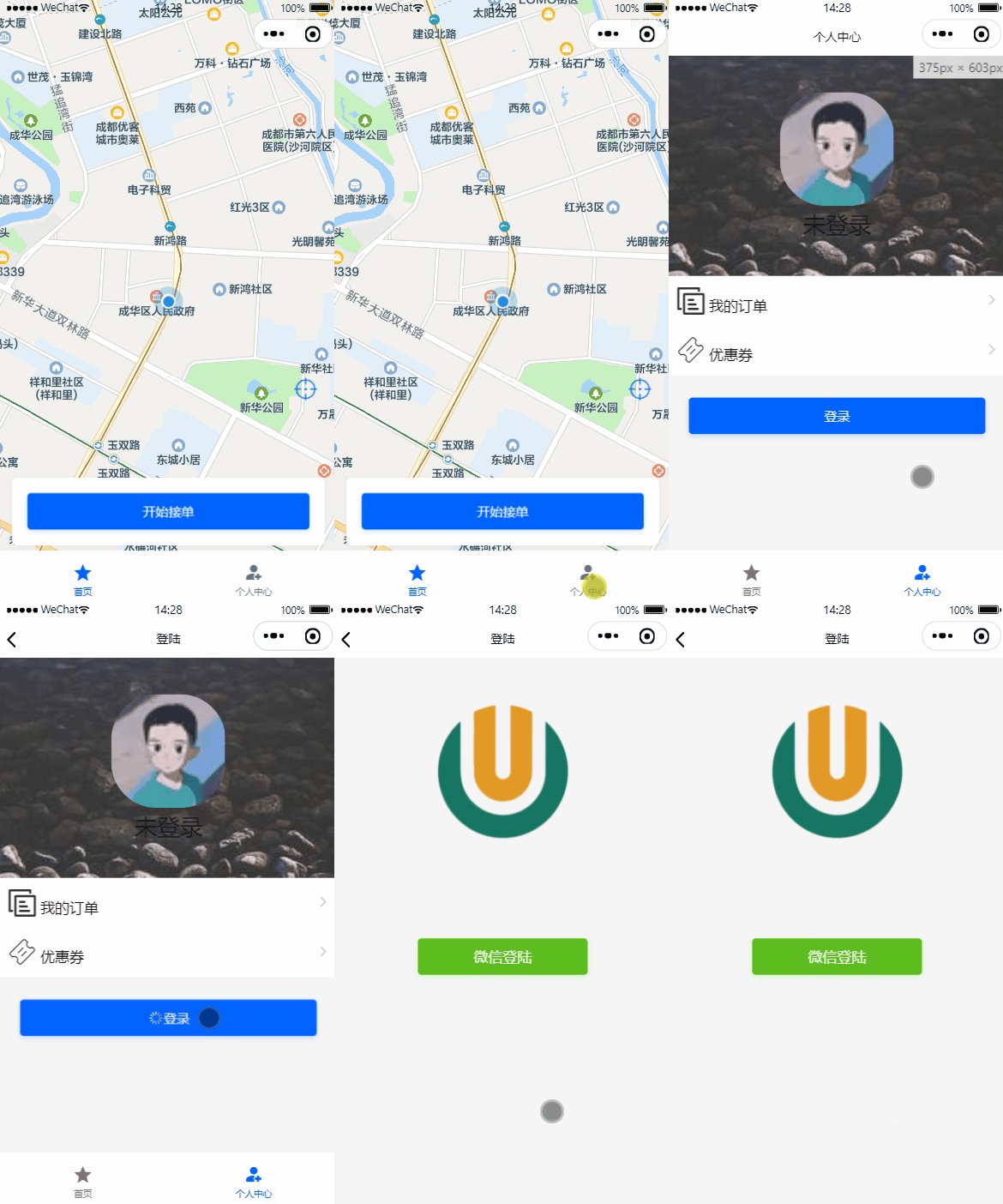
司机端登录跟乘客端登录一致,都是微信授权登录,司机第一次登录需要初始化司机设置消息、司机账户信息等。
1.1、司机微服务接口
操作模块:service-driver
1.1.1、pom.xml
引入依赖
1
2
3
4
| <dependency>
<groupId>com.github.binarywang</groupId>
<artifactId>weixin-java-miniapp</artifactId>
</dependency>
|
说明:在父工程已经对改依赖进行了版本管理,这里直接引入即可
1.1.2、common-account.yaml
添加配置(已加就忽略)
1
2
3
4
5
| wx:
miniapp:
#小程序授权登录
appId: wxcc651fcbab275e33 # 小程序微信公众平台appId
secret: 5f353399a2eae7ff6ceda383e924c5f6 # 小程序微信公众平台api秘钥
|
1.1.3、WxMaProperties
1
2
3
4
5
6
7
8
9
10
11
12
13
14
| package com.atguigu.daijia.driver.config;
import lombok.Data;
import org.springframework.boot.context.properties.ConfigurationProperties;
import org.springframework.stereotype.Component;
@Data
@Component
@ConfigurationProperties(prefix = "wx.miniapp")
public class WxMaProperties {
private String appId;
private String secret;
}
|
1.3.4、WxMaConfig
1
2
3
4
5
6
7
8
9
10
11
12
13
14
15
16
17
18
19
20
21
22
23
24
25
26
| package com.atguigu.daijia.driver.config;
import cn.binarywang.wx.miniapp.api.WxMaService;
import cn.binarywang.wx.miniapp.api.impl.WxMaServiceImpl;
import cn.binarywang.wx.miniapp.config.impl.WxMaDefaultConfigImpl;
import org.springframework.beans.factory.annotation.Autowired;
import org.springframework.context.annotation.Bean;
import org.springframework.stereotype.Component;
@Component
public class WxMaConfig {
@Autowired
private WxMaProperties wxMaProperties;
@Bean
public WxMaService wxMaService() {
WxMaDefaultConfigImpl config = new WxMaDefaultConfigImpl();
config.setAppid(wxMaProperties.getAppId());
config.setSecret(wxMaProperties.getSecret());
WxMaService service = new WxMaServiceImpl();
service.setWxMaConfig(config);
return service;
}
}
|
1.3.4、DriverInfoController
1
2
3
4
5
6
7
8
| @Autowired
private DriverInfoService driverInfoService;
@Operation(summary = "小程序授权登录")
@GetMapping("/login/{code}")
public Result<Long> login(@PathVariable String code) {
return Result.ok(driverInfoService.login(code));
}
|
1.3.5、DriverInfoService
1
| Long login(String code);
|
1.3.6、DriverInfoServiceImpl
1
2
3
4
5
6
7
8
9
10
11
12
13
14
15
16
17
18
19
20
21
22
23
24
25
26
27
28
29
30
31
32
33
34
35
36
37
38
39
40
41
42
43
44
45
46
47
48
49
50
51
52
53
54
55
56
57
58
59
| @Autowired
private DriverInfoMapper driverInfoMapper;
@Autowired
private DriverAccountMapper driverAccountMapper;
@Autowired
private WxMaService wxMaService;
@Autowired
private DriverSetMapper driverSetMapper;
@Autowired
private DriverLoginLogMapper driverLoginLogMapper;
@Transactional(rollbackFor = Exception.class)
@Override
public Long login(String code) {
String openId = null;
try {
WxMaJscode2SessionResult sessionInfo = wxMaService.getUserService().getSessionInfo(code);
openId = sessionInfo.getOpenid();
log.info("【小程序授权】openId={}", openId);
} catch (Exception e) {
e.printStackTrace();
throw new GuiguException(ResultCodeEnum.WX_CODE_ERROR);
}
DriverInfo driverInfo = this.getOne(new LambdaQueryWrapper<DriverInfo>().eq(DriverInfo::getWxOpenId, openId));
if (null == driverInfo) {
driverInfo = new DriverInfo();
driverInfo.setNickname(String.valueOf(System.currentTimeMillis()));
driverInfo.setAvatarUrl("https://oss.aliyuncs.com/aliyun_id_photo_bucket/default_handsome.jpg");
driverInfo.setWxOpenId(openId);
this.save(driverInfo);
DriverSet driverSet = new DriverSet();
driverSet.setDriverId(driverInfo.getId());
driverSet.setOrderDistance(new BigDecimal(0));
driverSet.setAcceptDistance(new BigDecimal(SystemConstant.ACCEPT_DISTANCE));
driverSet.setIsAutoAccept(0);
driverSetMapper.insert(driverSet);
DriverAccount driverAccount = new DriverAccount();
driverAccount.setDriverId(driverInfo.getId());
driverAccountMapper.insert(driverAccount);
}
DriverLoginLog driverLoginLog = new DriverLoginLog();
driverLoginLog.setDriverId(driverInfo.getId());
driverLoginLog.setMsg("小程序登录");
driverLoginLogMapper.insert(driverLoginLog);
return driverInfo.getId();
}
|
1.2、Feign接口
1.2.1、DriverInfoFeignClient
1
2
3
4
5
6
7
|
@GetMapping("/driver/info/login/{code}")
Result<Long> login(@PathVariable("code") String code);
|
1.3、司机端web接口
1.3.1、DriverController
1
2
3
4
5
6
7
8
| @Autowired
private DriverService driverService;
@Operation(summary = "小程序授权登录")
@GetMapping("/login/{code}")
public Result<String> login(@PathVariable String code) {
return Result.ok(driverService.login(code));
}
|
1.3.2、DriverService
1
| String login(String code);
|
1.3.3、DriverServiceImpl
1
2
3
4
5
6
7
8
9
10
11
12
13
14
15
16
| @Autowired
private DriverInfoFeignClient driverInfoFeignClient;
@Autowired
private RedisTemplate redisTemplate;
@SneakyThrows
@Override
public String login(String code) {
Long driverId = driverInfoFeignClient.login(code).getData();
String token = UUID.randomUUID().toString().replaceAll("-", "");
redisTemplate.opsForValue().set(RedisConstant.USER_LOGIN_KEY_PREFIX + token, driverId.toString(), RedisConstant.USER_LOGIN_KEY_TIMEOUT, TimeUnit.SECONDS);
return token;
}
|
说明:司机端登录后,也需要获取司机登录信息,页面才会跳转,同乘客端一致。
2、获取司机登录信息
司机端每天接单都要进行人脸识别,所以司机登录后都需要判断一下司机到底有没有录入人脸到人脸库
2.1、司机登录信息微服务接口
2.1.1、DriverInfoController
1
2
3
4
5
| @Operation(summary = "获取司机登录信息")
@GetMapping("/getDriverLoginInfo/{driverId}")
public Result<DriverLoginVo> getDriverLoginInfo(@PathVariable Long driverId) {
return Result.ok(driverInfoService.getDriverLoginInfo(driverId));
}
|
2.1.2、DriverInfoService
1
| DriverLoginVo getDriverLoginInfo(Long driverId);
|
2.1.3、DriverInfoServiceImpl
1
2
3
4
5
6
7
8
9
10
| @Override
public DriverLoginVo getDriverLoginInfo(Long driverId) {
DriverInfo driverInfo = this.getById(driverId);
DriverLoginVo driverLoginVo = new DriverLoginVo();
BeanUtils.copyProperties(driverInfo, driverLoginVo);
Boolean isArchiveFace = StringUtils.hasText(driverInfo.getFaceModelId());
driverLoginVo.setIsArchiveFace(isArchiveFace);
return driverLoginVo;
}
|
2.2、Feign接口
2.2.1、DriverInfoFeignClient
1
2
3
4
5
6
7
|
@GetMapping("/driver/info/getDriverLoginInfo/{driverId}")
Result<DriverLoginVo> getDriverLoginInfo(@PathVariable("driverId") Long driverId);
|
2.3、司机端web接口
2.3.1、DriverController
1
2
3
4
5
6
7
| @Operation(summary = "获取司机登录信息")
@GuiguLogin
@GetMapping("/getDriverLoginInfo")
public Result<DriverLoginVo> getDriverLoginInfo() {
Long driverId = AuthContextHolder.getUserId();
return Result.ok(driverService.getDriverLoginInfo(driverId));
}
|
2.3.2、DriverService
1
| DriverLoginVo getDriverLoginInfo(Long driverId);
|
2.3.3、DriverServiceImpl
1
2
3
4
| @Override
public DriverLoginVo getDriverLoginInfo(Long driverId) {
return driverInfoFeignClient.getDriverLoginInfo(driverId).getData();
}
|
3、开通腾讯云对象存储COS
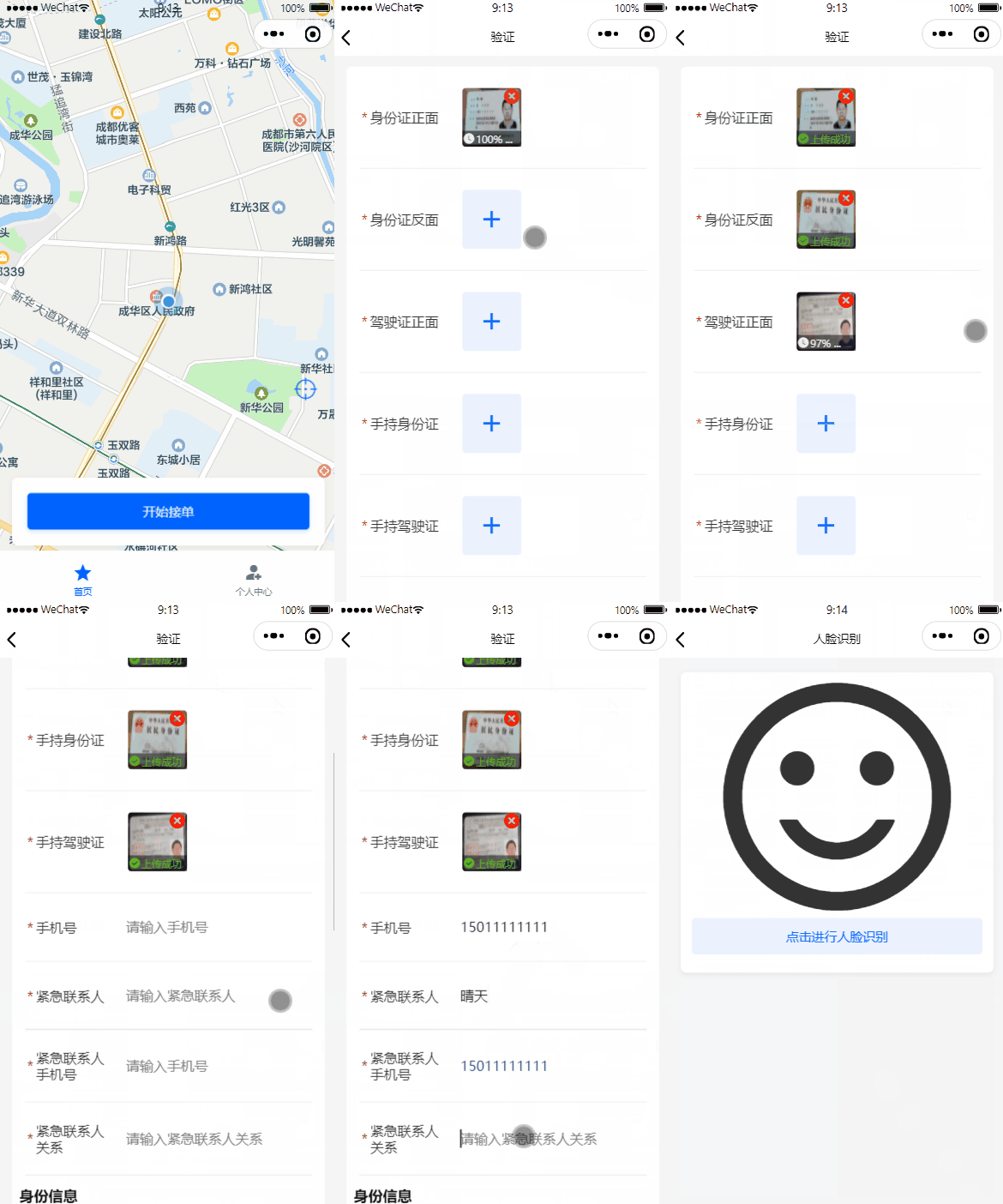
接下来我们要实现司机认证模块,司机认证模块需要集成腾讯云对象存储COS、腾讯云OCR证件识别及腾讯云人脸模型库创建,先学习完这些前置接口,再编写认证提交接口,如图:
3.1、开通腾讯云对象存储COS
首先注册与登录等腾讯云,官网地址:https://cloud.tencent.com/
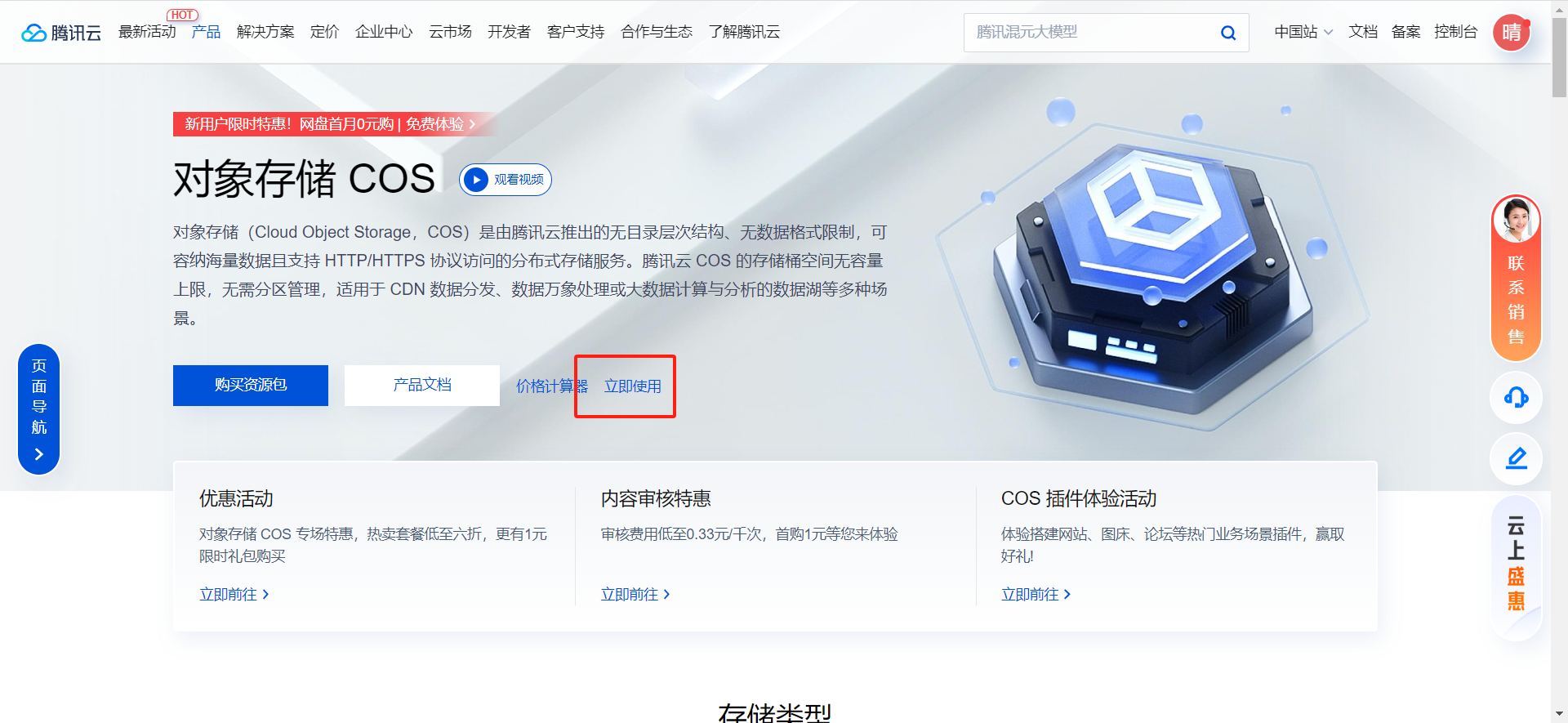
开通腾讯云对象存储COS:官网地址:https://cloud.tencent.com/product/cos
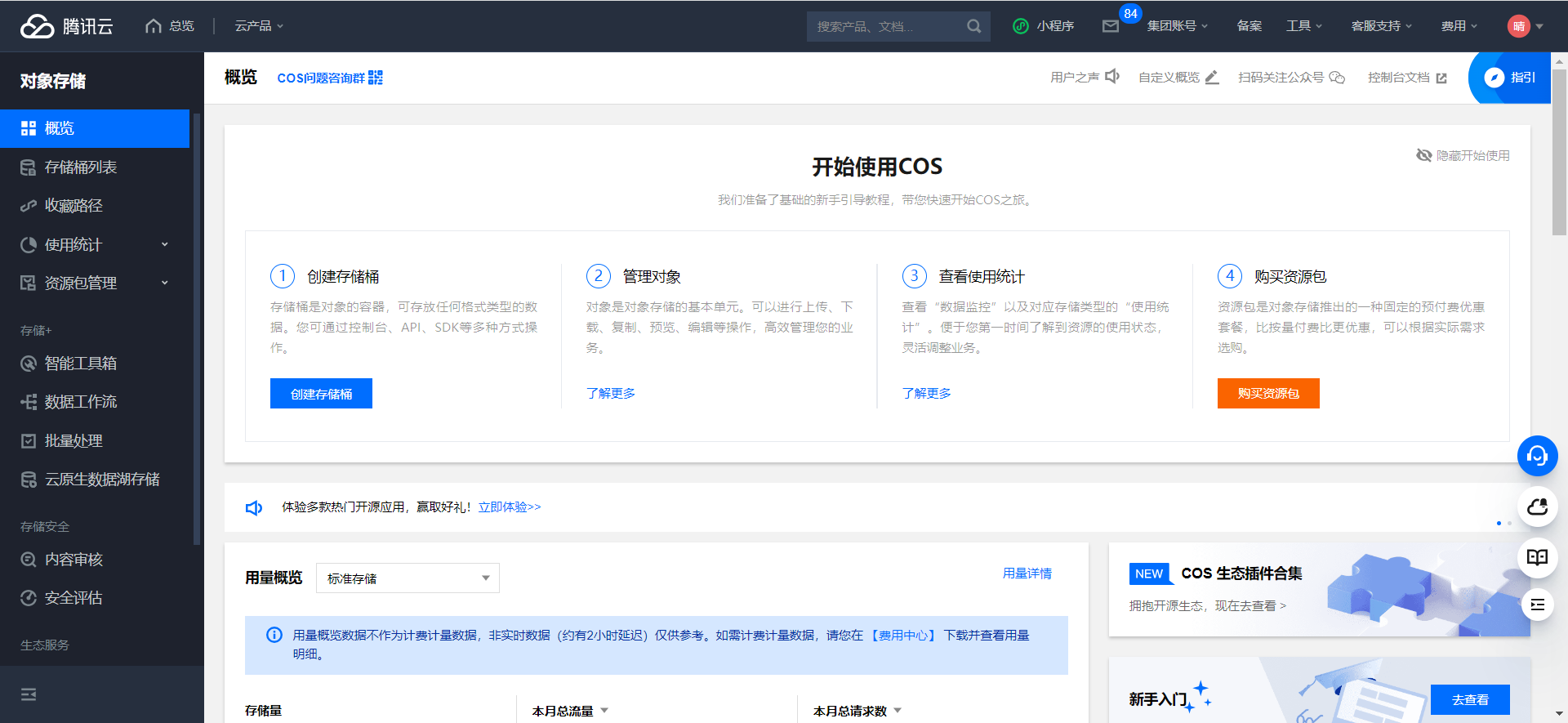
进入控制台:
3.2、获得腾讯云访问密钥
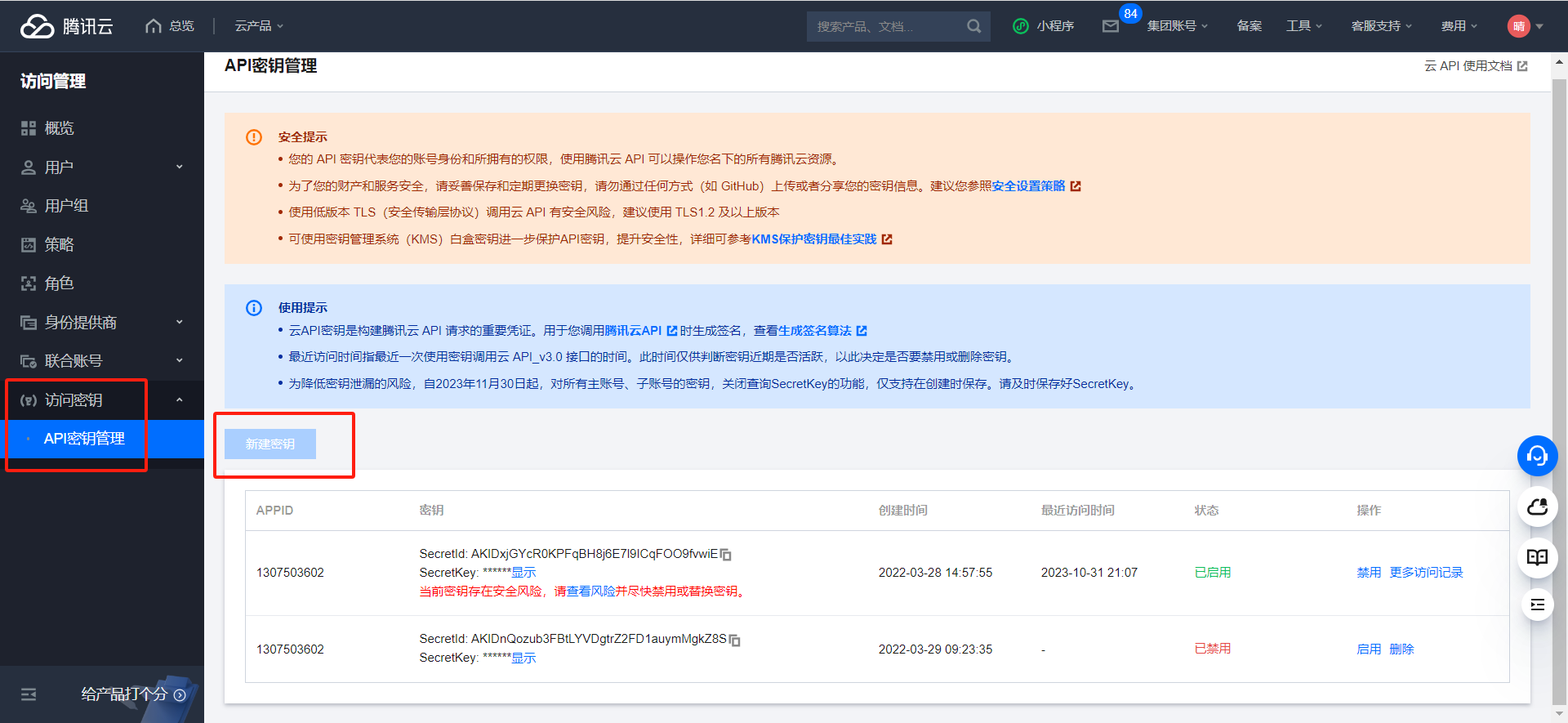
调用腾讯云各种服务是需要用到密钥的,例如数据万象、对象存储等等。
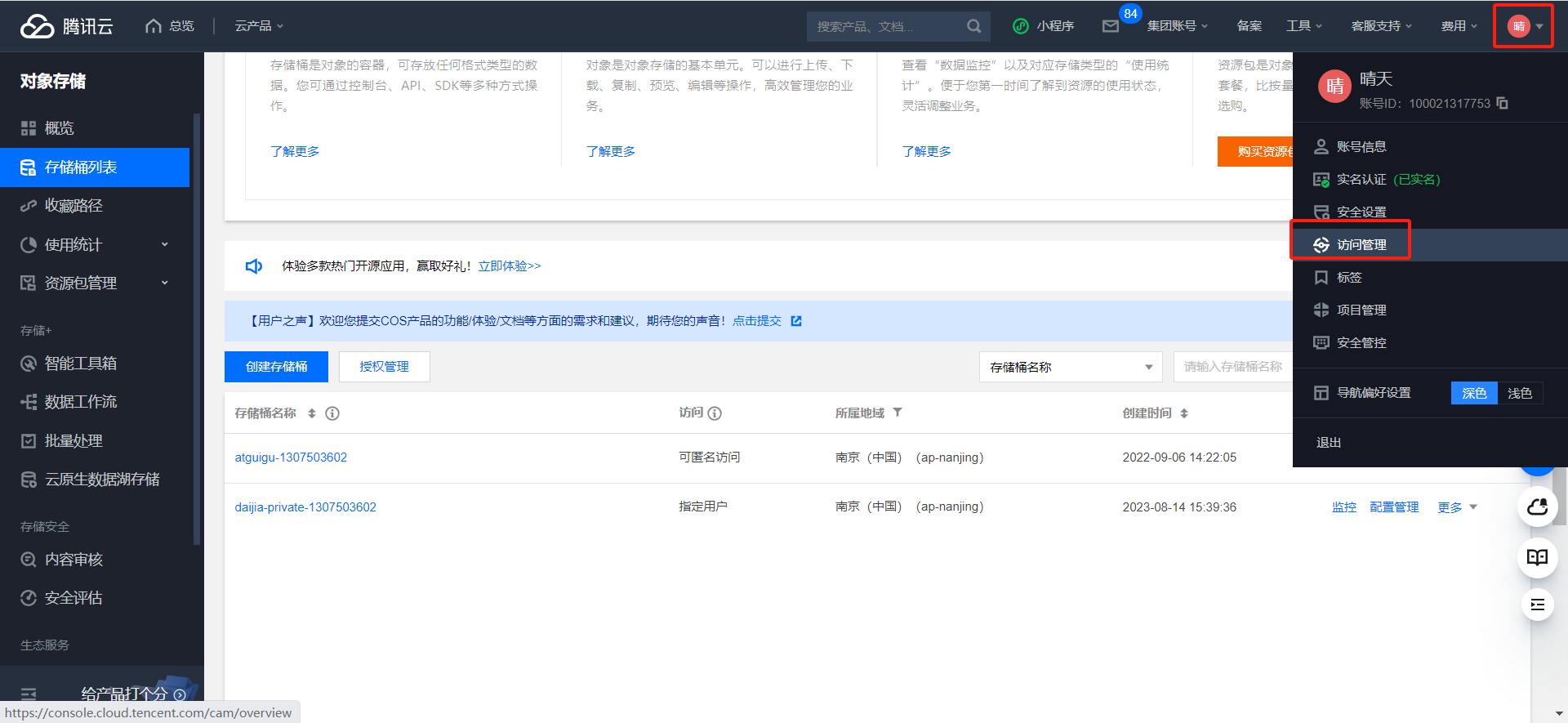
在访问管理页面中新建密钥,然后你把腾讯云的APPID、SecretId和SecretKey都记下来,一会儿我们写程序要用到。
3.3、创建存储桶
我们在对象存储中创建一个私有存储桶,用来存放身份证和驾驶证这些保密度较高的图片。
创建私有存储桶:
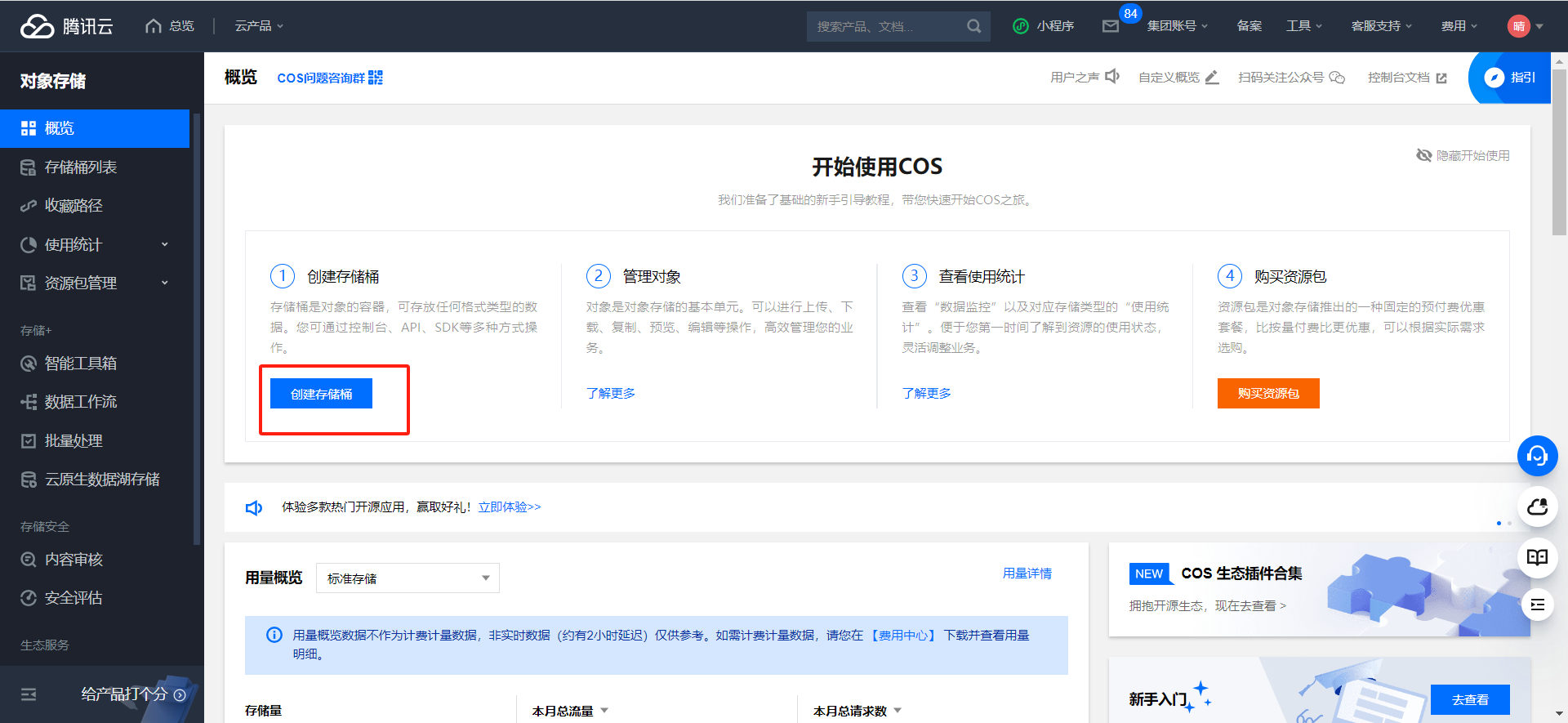
创建存储桶:
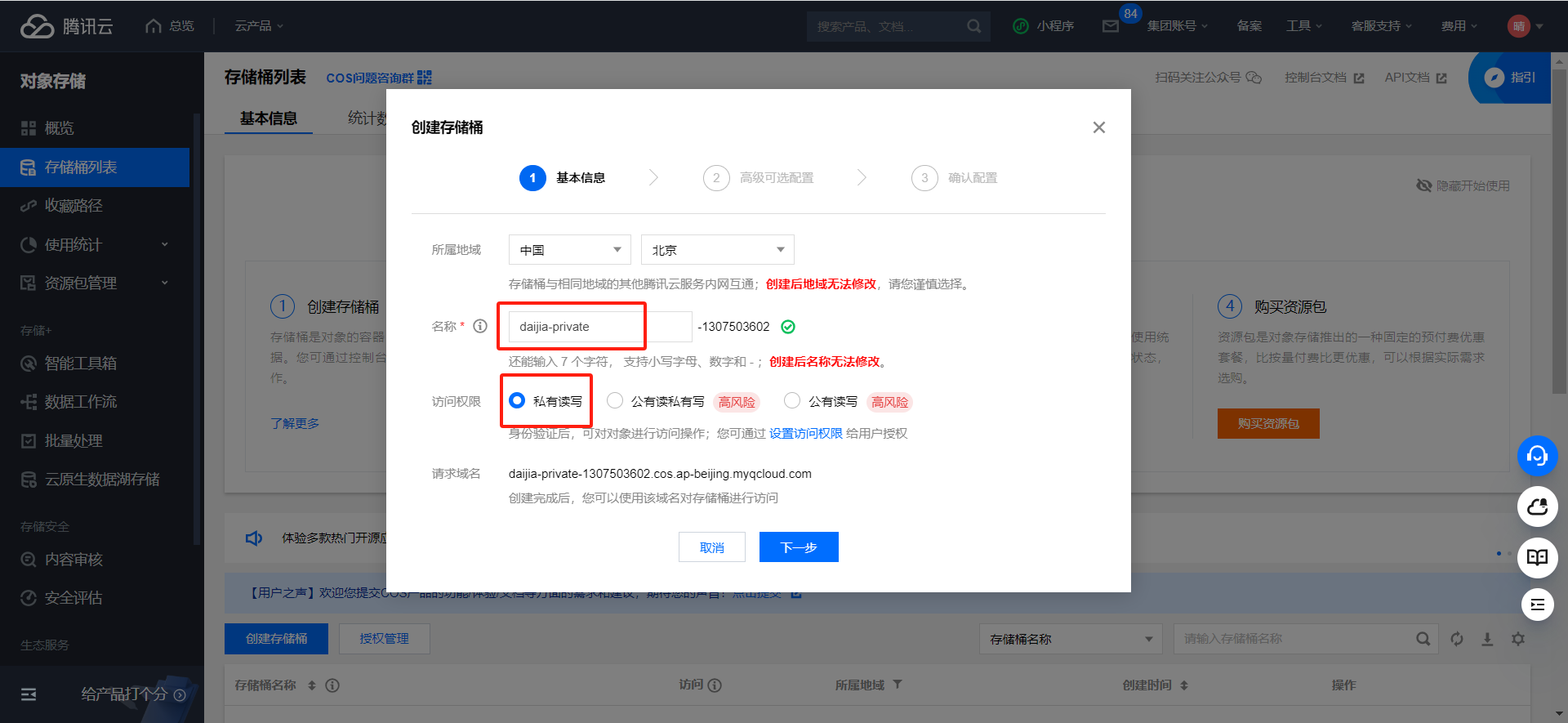
下一步:
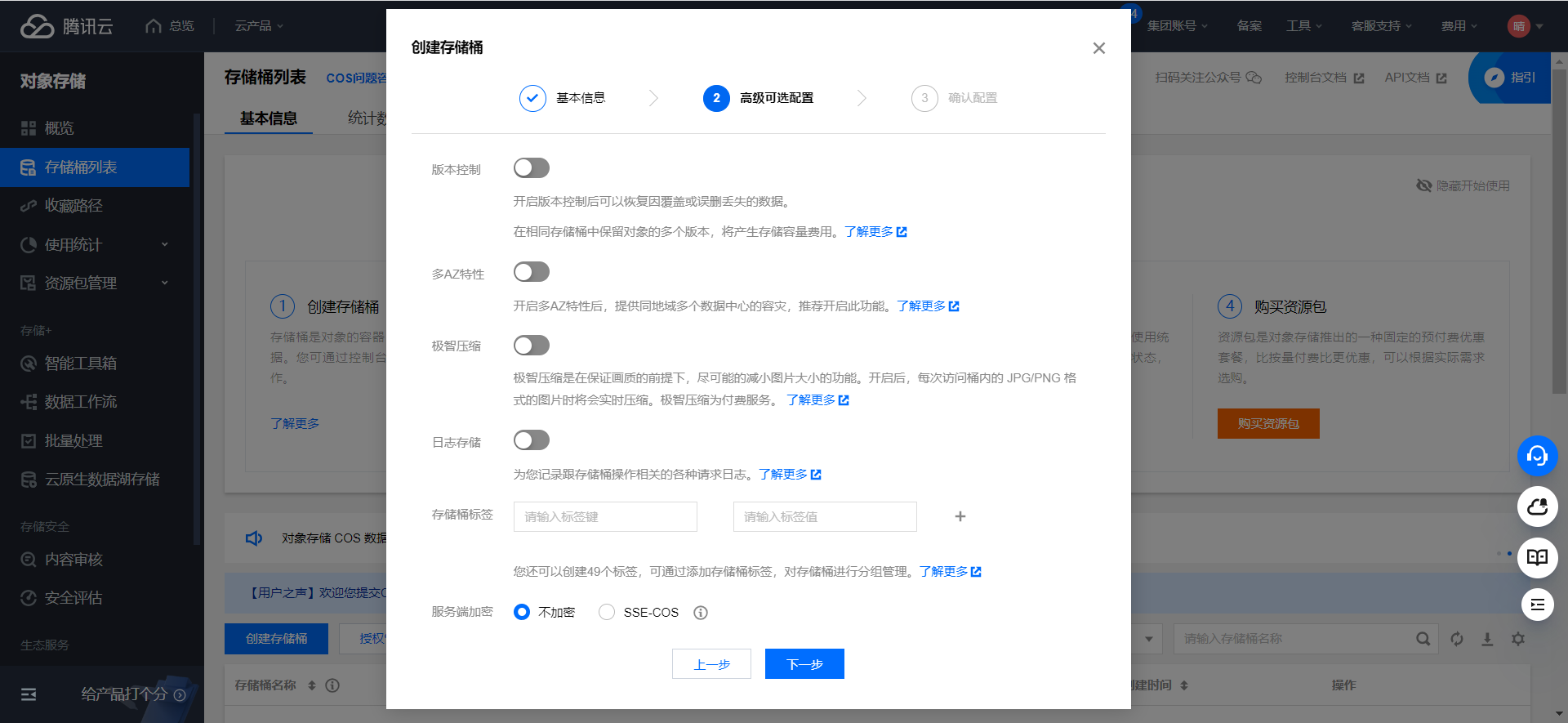
下一步:
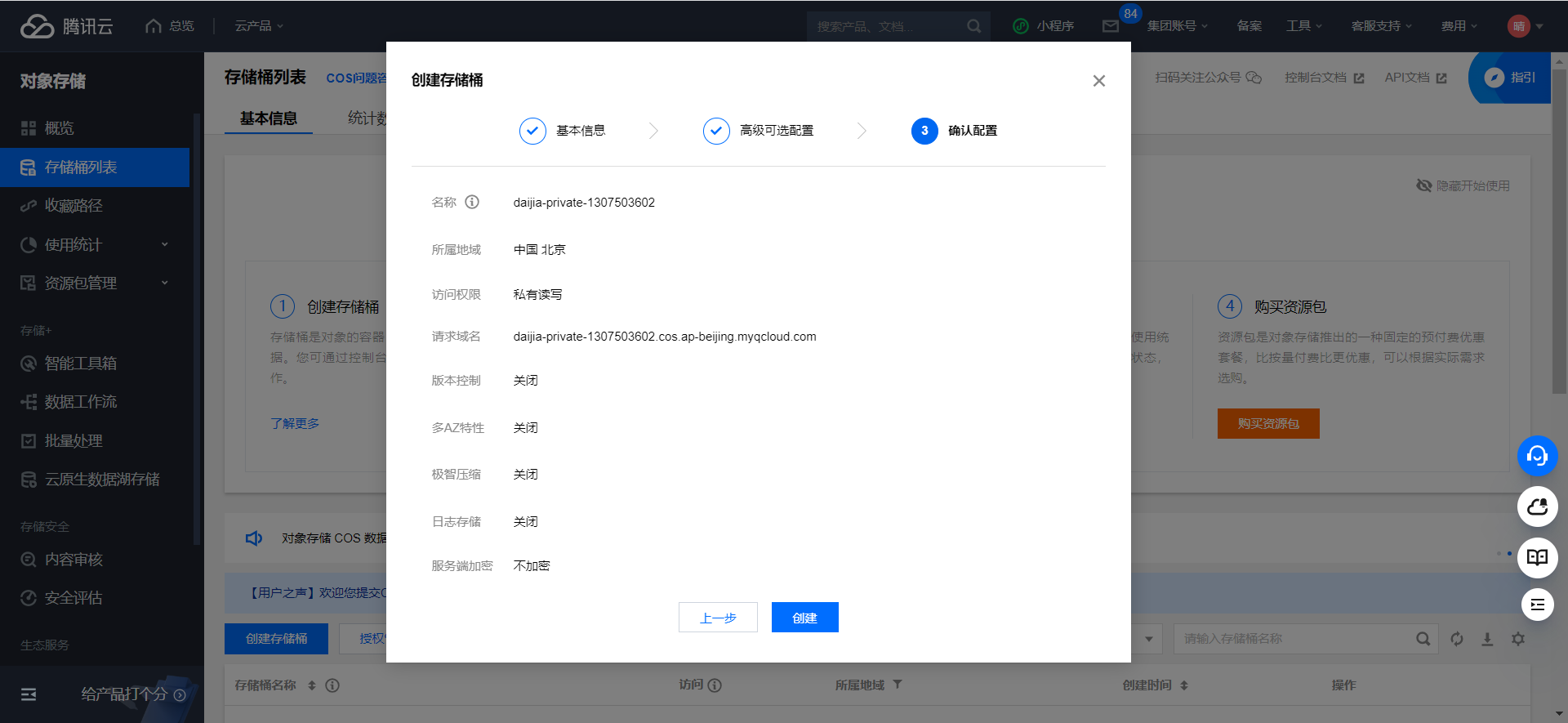
创建
3.4、API文档
文档地址:https://cloud.tencent.com/document/product/436/10199
初始化客户端
1
2
3
4
5
6
7
8
9
10
11
12
13
14
|
String secretId = "SECRETID";
String secretKey = "SECRETKEY";
COSCredentials cred = new BasicCOSCredentials(secretId, secretKey);
Region region = new Region("COS_REGION");
ClientConfig clientConfig = new ClientConfig(region);
clientConfig.setHttpProtocol(HttpProtocol.https);
COSClient cosClient = new COSClient(cred, clientConfig);
|
上传对象
1
2
3
4
5
6
7
8
|
File localFile = new File(localFilePath);
String bucketName = "examplebucket-1250000000";
String key = "exampleobject";
PutObjectRequest putObjectRequest = new PutObjectRequest(bucketName, key, localFile);
PutObjectResult putObjectResult = cosClient.putObject(putObjectRequest);
|
删除对象:删除 COS 上指定路径的对象,代码如下:
1
2
3
4
5
|
String bucketName = "examplebucket-1250000000";
String key = "exampleobject";
cosClient.deleteObject(bucketName, key);
|
4、对象云存储COS上传接口
上传证件照到腾讯云私有存储桶,证件信息属于隐私信息,不能随便访问,得有对应的权限才能申请临时访问url。我们先编写上传接口。
4.1、司机微服务接口
4.1.1、添加依赖
1
2
3
4
| <dependency>
<groupId>com.qcloud</groupId>
<artifactId>cos_api</artifactId>
</dependency>
|
4.1.2、common-account.yaml
1
2
3
4
5
6
| tencent:
cloud:
secretId: AKIDxjGYcR0KPFqBH8j6E7l9ICq****
secretKey: KPFsGPJyNWQ5WheNq55qMcdOuABw****
region: ap-nanjing
bucketPrivate: daijia-private-1307503602
|
4.1.3、TencentCloudProperties
1
2
3
4
5
6
7
8
9
10
11
12
13
14
15
16
| package com.atguigu.daijia.driver.config;
import lombok.Data;
import org.springframework.boot.context.properties.ConfigurationProperties;
import org.springframework.stereotype.Component;
@Data
@Component
@ConfigurationProperties(prefix = "tencent.cloud")
public class TencentCloudProperties {
private String secretId;
private String secretKey;
private String region;
private String bucketPrivate;
}
|
4.1.4、CosController
1
2
3
4
5
6
7
8
| @Autowired
private CosService cosService;
@Operation(summary = "上传")
@PostMapping("/upload")
public Result<CosUploadVo> upload(@RequestPart("file") MultipartFile file, @RequestParam("path") String path) {
return Result.ok(cosService.upload(file, path));
}
|
4.1.5、CosService
1
| CosUploadVo upload(MultipartFile file, String module);
|
4.1.6、CosServiceImpl
1
2
3
4
5
6
7
8
9
10
11
12
13
14
15
16
17
18
19
20
21
22
23
24
25
26
27
28
29
30
31
32
33
34
35
36
37
38
39
40
41
42
43
44
45
| @Autowired
private TencentCloudProperties tencentCloudProperties;
private COSClient getPrivateCOSClient() {
COSCredentials cred = new BasicCOSCredentials(tencentCloudProperties.getSecretId(), tencentCloudProperties.getSecretKey());
ClientConfig clientConfig = new ClientConfig(new Region(tencentCloudProperties.getRegion()));
clientConfig.setHttpProtocol(HttpProtocol.https);
COSClient cosClient = new COSClient(cred, clientConfig);
return cosClient;
}
@SneakyThrows
@Override
public CosUploadVo upload(MultipartFile file, String path) {
COSClient cosClient = this.getPrivateCOSClient();
ObjectMetadata meta = new ObjectMetadata();
meta.setContentLength(file.getSize());
meta.setContentEncoding("UTF-8");
meta.setContentType(file.getContentType());
String fileType = file.getOriginalFilename().substring(file.getOriginalFilename().lastIndexOf("."));
String uploadPath = "/driver/" + path + "/" + UUID.randomUUID().toString().replaceAll("-", "") + fileType;
PutObjectRequest putObjectRequest = new PutObjectRequest(tencentCloudProperties.getBucketPrivate(), uploadPath, file.getInputStream(), meta);
putObjectRequest.setStorageClass(StorageClass.Standard);
PutObjectResult putObjectResult = cosClient.putObject(putObjectRequest);
log.info(JSON.toJSONString(putObjectResult));
cosClient.shutdown();
CosUploadVo cosUploadVo = new CosUploadVo();
cosUploadVo.setUrl(uploadPath);
cosUploadVo.setShowUrl("");
return cosUploadVo;
}
|
4.2、Feign接口
4.2.1、CosFeignClient
1
2
3
4
5
6
7
8
|
@PostMapping(value = "/cos/upload", consumes = MediaType.MULTIPART_FORM_DATA_VALUE)
Result<CosUploadVo> upload(@RequestPart("file") MultipartFile file, @RequestParam("path") String path);
|
注:consumes = MediaType.MULTIPART_FORM_DATA_VALUE
4.3、司机端web接口
4.3.1、CosController
1
2
3
4
5
6
7
8
9
| @Autowired
private CosService cosService;
@Operation(summary = "上传")
@GuiguLogin
@PostMapping("/upload")
public Result<CosUploadVo> upload(@RequestPart("file") MultipartFile file, @RequestParam(name = "path", defaultValue = "auth") String path) {
return Result.ok(cosService.upload(file, path));
}
|
4.3.2、CosService
1
| CosUploadVo upload(MultipartFile file, String path);
|
4.3.3、CosServiceImpl
1
2
3
4
| @Override
public CosUploadVo upload(MultipartFile file, String path) {
return cosFeignClient.upload(file, path).getData();
}
|
5、获取临时签名URL
上面我们实现了上传,但是页面回显还不能显示,当前我们来实现获取临时签名url接口,当前接口不需要对外服务,所以只是编写一个service方法即可。
官方文档地址:https://cloud.tencent.com/document/product/436/35217
5.1、司机微服务接口
5.1.1、CosService
1
| String getImageUrl(String path);
|
5.1.2、CosServiceImpl
1
2
3
4
5
6
7
8
9
10
11
12
13
14
| @Override
public String getImageUrl(String path) {
if(!StringUtils.hasText(path)) return "";
COSClient cosClient = getPrivateCOSClient();
GeneratePresignedUrlRequest request =
new GeneratePresignedUrlRequest(tencentCloudProperties.getBucketPrivate(), path, HttpMethodName.GET);
Date expiration = new DateTime().plusMinutes(15).toDate();
request.setExpiration(expiration);
URL url = cosClient.generatePresignedUrl(request);
cosClient.shutdown();
return url.toString();
}
|
5.2、完善上传接口
5.2.1、CosServiceImpl
关键代码:
1
2
|
cosUploadVo.setShowUrl(this.getImageUrl(path));
|
完整代码:
1
2
3
4
5
6
7
8
9
10
11
12
13
14
15
16
17
18
19
20
21
22
23
24
25
26
27
| @SneakyThrows
@Override
public CosUploadVo upload(MultipartFile file, String path) {
COSClient cosClient = this.getPrivateCOSClient();
ObjectMetadata meta = new ObjectMetadata();
meta.setContentLength(file.getSize());
meta.setContentEncoding("UTF-8");
meta.setContentType(file.getContentType());
String fileType = file.getOriginalFilename().substring(file.getOriginalFilename().lastIndexOf("."));
String uploadPath = "/driver/" + path + "/" + UUID.randomUUID().toString().replaceAll("-", "") + fileType;
PutObjectRequest putObjectRequest = new PutObjectRequest(tencentCloudProperties.getBucketPrivate(), uploadPath, file.getInputStream(), meta);
putObjectRequest.setStorageClass(StorageClass.Standard);
PutObjectResult putObjectResult = cosClient.putObject(putObjectRequest);
log.info(JSON.toJSONString(putObjectResult));
cosClient.shutdown();
CosUploadVo cosUploadVo = new CosUploadVo();
cosUploadVo.setUrl(uploadPath);
cosUploadVo.setShowUrl(this.getImageUrl(uploadPath));
return cosUploadVo;
}
|
6、腾讯云身份证识别接口
司机注册成功之后,应该引导他去做实名认证,这就需要用到腾讯云身份证识别和云存储功能了
身份证识别API地址:https://cloud.tencent.com/document/product/866/33524
6.1、司机端微服务接口
6.1.1、OcrController
1
2
3
4
5
6
7
8
| @Autowired
private OcrService ocrService;
@Operation(summary = "身份证识别")
@PostMapping("/idCardOcr")
public Result<IdCardOcrVo> idCardOcr(@RequestPart("file") MultipartFile file) {
return Result.ok(ocrService.idCardOcr(file));
}
|
6.1.2、OcrService
1
| IdCardOcrVo idCardOcr(MultipartFile file);
|
6.1.3、OcrServiceImpl
1
2
3
4
5
6
7
8
9
10
11
12
13
14
15
16
17
18
19
20
21
22
23
24
25
26
27
28
29
30
31
32
33
34
35
36
37
38
39
40
41
42
43
44
45
46
47
48
49
50
51
52
53
54
55
56
57
58
59
60
61
62
63
64
65
66
67
68
| @Autowired
private CosService cosService;
@Autowired
private TencentCloudProperties tencentCloudProperties;
@SneakyThrows
@Override
public IdCardOcrVo idCardOcr(MultipartFile file) {
byte[] encoder = Base64.encodeBase64(file.getBytes());
String idCardBase64 = new String(encoder);
Credential cred = new Credential(tencentCloudProperties.getSecretId(), tencentCloudProperties.getSecretKey());
HttpProfile httpProfile = new HttpProfile();
httpProfile.setEndpoint("ocr.tencentcloudapi.com");
ClientProfile clientProfile = new ClientProfile();
clientProfile.setHttpProfile(httpProfile);
OcrClient client = new OcrClient(cred, tencentCloudProperties.getRegion(), clientProfile);
IDCardOCRRequest req = new IDCardOCRRequest();
req.setImageBase64(idCardBase64);
IDCardOCRResponse resp = client.IDCardOCR(req);
log.info(IDCardOCRResponse.toJsonString(resp));
IdCardOcrVo idCardOcrVo = new IdCardOcrVo();
if (StringUtils.hasText(resp.getName())) {
idCardOcrVo.setName(resp.getName());
idCardOcrVo.setGender("男".equals(resp.getSex()) ? "1" : "2");
idCardOcrVo.setBirthday(DateTimeFormat.forPattern("yyyy/MM/dd").parseDateTime(resp.getBirth()).toDate());
idCardOcrVo.setIdcardNo(resp.getIdNum());
idCardOcrVo.setIdcardAddress(resp.getAddress());
CosUploadVo cosUploadVo = cosService.upload(file, "idCard");
idCardOcrVo.setIdcardFrontUrl(cosUploadVo.getUrl());
idCardOcrVo.setIdcardFrontShowUrl(cosUploadVo.getShowUrl());
} else {
String idcardExpireString = resp.getValidDate().split("-")[1];
idCardOcrVo.setIdcardExpire(DateTimeFormat.forPattern("yyyy.MM.dd").parseDateTime(idcardExpireString).toDate());
CosUploadVo cosUploadVo = cosService.upload(file, "idCard");
idCardOcrVo.setIdcardBackUrl(cosUploadVo.getUrl());
idCardOcrVo.setIdcardBackShowUrl(cosUploadVo.getShowUrl());
}
return idCardOcrVo;
}
|
6.2、Feign接口
6.2.1、CosFeignClient
1
2
3
4
5
6
7
|
@PostMapping(value = "/ocr/idCardOcr", consumes = MediaType.MULTIPART_FORM_DATA_VALUE)
Result<IdCardOcrVo> idCardOcr(@RequestPart("file") MultipartFile file);
|
注:consumes = MediaType.MULTIPART_FORM_DATA_VALUE
6.3、司机端web接口
6.3.1、OcrController
1
2
3
4
5
6
| @Operation(summary = "身份证识别")
@GuiguLogin
@PostMapping("/idCardOcr")
public Result<IdCardOcrVo> uploadDriverLicenseOcr(@RequestPart("file") MultipartFile file) {
return Result.ok(ocrService.idCardOcr(file));
}
|
6.3.2、OcrService
1
| IdCardOcrVo idCardOcr(MultipartFile file);
|
6.3.3、OcrServiceImpl
1
2
3
4
5
6
7
| @Autowired
private OcrFeignClient ocrFeignClient;
@Override
public IdCardOcrVo idCardOcr(MultipartFile file) {
return ocrFeignClient.idCardOcr(file).getData();
}
|
7、腾讯云驾驶证识别接口
驾驶证识别API地址:https://cloud.tencent.com/document/product/866/36213
7.1、司机端微服务接口
7.1.1、OcrController
1
2
3
4
5
| @Operation(summary = "驾驶证识别")
@PostMapping("/driverLicenseOcr")
public Result<DriverLicenseOcrVo> driverLicenseOcr(@RequestPart("file") MultipartFile file) {
return Result.ok(ocrService.driverLicenseOcr(file));
}
|
7.1.2、OcrService
1
| DriverLicenseOcrVo driverLicenseOcr(MultipartFile file);
|
7.1.3、OcrServiceImpl
1
2
3
4
5
6
7
8
9
10
11
12
13
14
15
16
17
18
19
20
21
22
23
24
25
26
27
28
29
30
31
32
33
34
35
36
37
38
39
40
41
42
43
44
45
46
47
48
49
50
51
52
53
54
55
56
57
58
59
|
@SneakyThrows
@Override
public DriverLicenseOcrVo driverLicenseOcr(MultipartFile file) {
byte[] encoder = Base64.encodeBase64(file.getBytes());
String driverLicenseBase64 = new String(encoder);
Credential cred = new Credential(tencentCloudProperties.getSecretId(), tencentCloudProperties.getSecretKey());
HttpProfile httpProfile = new HttpProfile();
httpProfile.setEndpoint("ocr.tencentcloudapi.com");
ClientProfile clientProfile = new ClientProfile();
clientProfile.setHttpProfile(httpProfile);
OcrClient client = new OcrClient(cred, tencentCloudProperties.getRegion(), clientProfile);
DriverLicenseOCRRequest req = new DriverLicenseOCRRequest();
req.setImageBase64(driverLicenseBase64);
DriverLicenseOCRResponse resp = client.DriverLicenseOCR(req);
log.info(VehicleLicenseOCRResponse.toJsonString(resp));
DriverLicenseOcrVo driverLicenseOcrVo = new DriverLicenseOcrVo();
if (StringUtils.hasText(resp.getName())) {
driverLicenseOcrVo.setName(resp.getName());
driverLicenseOcrVo.setDriverLicenseClazz(resp.getClass_());
driverLicenseOcrVo.setDriverLicenseNo(resp.getCardCode());
driverLicenseOcrVo.setDriverLicenseIssueDate(DateTimeFormat.forPattern("yyyy-MM-dd").parseDateTime(resp.getDateOfFirstIssue()).toDate());
driverLicenseOcrVo.setDriverLicenseExpire(DateTimeFormat.forPattern("yyyy-MM-dd").parseDateTime(resp.getEndDate()).toDate());
CosUploadVo cosUploadVo = cosService.upload(file, "driverLicense");
driverLicenseOcrVo.setDriverLicenseFrontUrl(cosUploadVo.getUrl());
driverLicenseOcrVo.setDriverLicenseFrontShowUrl(cosUploadVo.getShowUrl());
} else {
CosUploadVo cosUploadVo = cosService.upload(file, "driverLicense");
driverLicenseOcrVo.setDriverLicenseBackUrl(cosUploadVo.getUrl());
driverLicenseOcrVo.setDriverLicenseBackShowUrl(cosUploadVo.getShowUrl());
}
return driverLicenseOcrVo;
}
|
7.2、Feign接口
7.2.1、OcrFeignClient
1
2
3
4
5
6
7
|
@PostMapping(value = "/ocr/driverLicenseOcr", consumes = MediaType.MULTIPART_FORM_DATA_VALUE)
Result<DriverLicenseOcrVo> driverLicenseOcr(@RequestPart("file") MultipartFile file);
|
注:consumes = MediaType.MULTIPART_FORM_DATA_VALUE
7.3、司机端web接口
7.3.1、OcrController
1
2
3
4
5
6
| @Operation(summary = "驾驶证识别")
@GuiguLogin
@PostMapping("/driverLicenseOcr")
public Result<DriverLicenseOcrVo> driverLicenseOcr(@RequestPart("file") MultipartFile file) {
return Result.ok(ocrService.driverLicenseOcr(file));
}
|
7.3.2、OcrService
1
| DriverLicenseOcrVo driverLicenseOcr(MultipartFile file);
|
7.3.3、OcrServiceImpl
1
2
3
4
| @Override
public DriverLicenseOcrVo driverLicenseOcr(MultipartFile file) {
return ocrFeignClient.driverLicenseOcr(file).getData();
}
|
8、获取司机认证信息
司机登录成功后,会判断司机是否认证,如果未认证调到认证页面,认证页面为修改与查看页面,未认证通过可反复提交认证,因此我们要先查看认证信息。
进入认证页面我们要回显证件信息,因此要申请临时访问路径。
8.1、获取司机认证信息微服务接口
8.1.1、DriverInfoController
1
2
3
4
5
| @Operation(summary = "获取司机认证信息")
@GetMapping("/getDriverAuthInfo/{driverId}")
Result<DriverAuthInfoVo> getDriverAuthInfo(@PathVariable("driverId") Long driverId) {
return Result.ok(driverInfoService.getDriverAuthInfo(driverId));
}
|
8.1.2、DriverInfoService
1
| DriverAuthInfoVo getDriverAuthInfo(Long driverId);
|
8.1.3、DriverInfoServiceImpl
1
2
3
4
5
6
7
8
9
10
11
12
13
14
15
16
| @Autowired
private CosService cosService;
@Override
public DriverAuthInfoVo getDriverAuthInfo(Long driverId) {
DriverInfo driverInfo = this.getById(driverId);
DriverAuthInfoVo driverAuthInfoVo = new DriverAuthInfoVo();
BeanUtils.copyProperties(driverInfo, driverAuthInfoVo);
driverAuthInfoVo.setIdcardBackShowUrl(cosService.getImageUrl(driverAuthInfoVo.getIdcardBackUrl()));
driverAuthInfoVo.setIdcardFrontShowUrl(cosService.getImageUrl(driverAuthInfoVo.getIdcardFrontUrl()));
driverAuthInfoVo.setIdcardHandShowUrl(cosService.getImageUrl(driverAuthInfoVo.getIdcardHandUrl()));
driverAuthInfoVo.setDriverLicenseFrontShowUrl(cosService.getImageUrl(driverAuthInfoVo.getDriverLicenseFrontUrl()));
driverAuthInfoVo.setDriverLicenseBackShowUrl(cosService.getImageUrl(driverAuthInfoVo.getDriverLicenseBackUrl()));
driverAuthInfoVo.setDriverLicenseHandShowUrl(cosService.getImageUrl(driverAuthInfoVo.getDriverLicenseHandUrl()));
return driverAuthInfoVo;
}
|
8.2、Feign接口
8.2.1、DriverInfoFeignClient
1
2
3
4
5
6
7
|
@GetMapping("/driver/info/getDriverAuthInfo/{driverId}")
Result<DriverAuthInfoVo> getDriverAuthInfo(@PathVariable("driverId") Long driverId);
|
8.3、司机端web接口
8.3.1、DriverController
1
2
3
4
5
6
7
| @Operation(summary = "获取司机认证信息")
@GuiguLogin
@GetMapping("/getDriverAuthInfo")
public Result<DriverAuthInfoVo> getDriverAuthInfo() {
Long driverId = AuthContextHolder.getUserId();
return Result.ok(driverService.getDriverAuthInfo(driverId));
}
|
8.3.2、DriverService
1
| DriverAuthInfoVo getDriverAuthInfo(Long driverId);
|
8.3.3、DriverServiceImpl
1
2
3
4
| @Override
public DriverAuthInfoVo getDriverAuthInfo(Long driverId) {
return driverInfoFeignClient.getDriverAuthInfo(driverId).getData();
}
|
9、修改司机认证信息
认证状态:
0:未认证 【刚注册完为未认证状态】
1:审核中 【提交了认证信息后变为审核中】
2:认证通过 【后台审核通过】
-1:认证未通过【后台审核不通过】
司机开启接单的条件:
1、认证通过
2、建立了腾讯云人员库人员
3、当日验证了人脸识别
9.1、修改司机认证信息微服务接口
9.1.1、DriverInfoController
1
2
3
4
5
| @Operation(summary = "更新司机认证信息")
@PostMapping("/updateDriverAuthInfo")
public Result<Boolean> UpdateDriverAuthInfo(@RequestBody UpdateDriverAuthInfoForm updateDriverAuthInfoForm) {
return Result.ok(driverInfoService.updateDriverAuthInfo(updateDriverAuthInfoForm));
}
|
9.1.2、DriverInfoService
1
| Boolean updateDriverAuthInfo(UpdateDriverAuthInfoForm updateDriverAuthInfoForm);
|
9.1.3、DriverInfoServiceImpl
1
2
3
4
5
6
7
8
| @Transactional(rollbackFor = Exception.class)
@Override
public Boolean updateDriverAuthInfo(UpdateDriverAuthInfoForm updateDriverAuthInfoForm) {
DriverInfo driverInfo = new DriverInfo();
driverInfo.setId(updateDriverAuthInfoForm.getDriverId());
BeanUtils.copyProperties(updateDriverAuthInfoForm, driverInfo);
return this.updateById(driverInfo);
}
|
9.2、Feign接口
9.2.1、DriverInfoFeignClient
1
2
3
4
5
6
7
|
@PostMapping("/driver/info/updateDriverAuthInfo")
Result<Boolean> UpdateDriverAuthInfo(@RequestBody UpdateDriverAuthInfoForm updateDriverAuthInfoForm);
|
9.3、司机端web接口
9.3.1、DriverController
1
2
3
4
5
6
7
| @Operation(summary = "更新司机认证信息")
@GuiguLogin
@PostMapping("/updateDriverAuthInfo")
public Result<Boolean> updateDriverAuthInfo(@RequestBody UpdateDriverAuthInfoForm updateDriverAuthInfoForm) {
updateDriverAuthInfoForm.setDriverId(AuthContextHolder.getUserId());
return Result.ok(driverService.updateDriverAuthInfo(updateDriverAuthInfoForm));
}
|
9.3.2、DriverService
1
| Boolean updateDriverAuthInfo(UpdateDriverAuthInfoForm updateDriverAuthInfoForm);
|
9.3.3、DriverServiceImpl
1
2
3
4
| @Override
public Boolean updateDriverAuthInfo(UpdateDriverAuthInfoForm updateDriverAuthInfoForm) {
return driverInfoFeignClient.UpdateDriverAuthInfo(updateDriverAuthInfoForm).getData();
}
|
10、开通人脸识别
新注册的司机都要采集面部信息,以便司机每天第一次接单的时候做身份核验。类似公司人脸打卡,先录入人脸,后续打卡在验证人脸
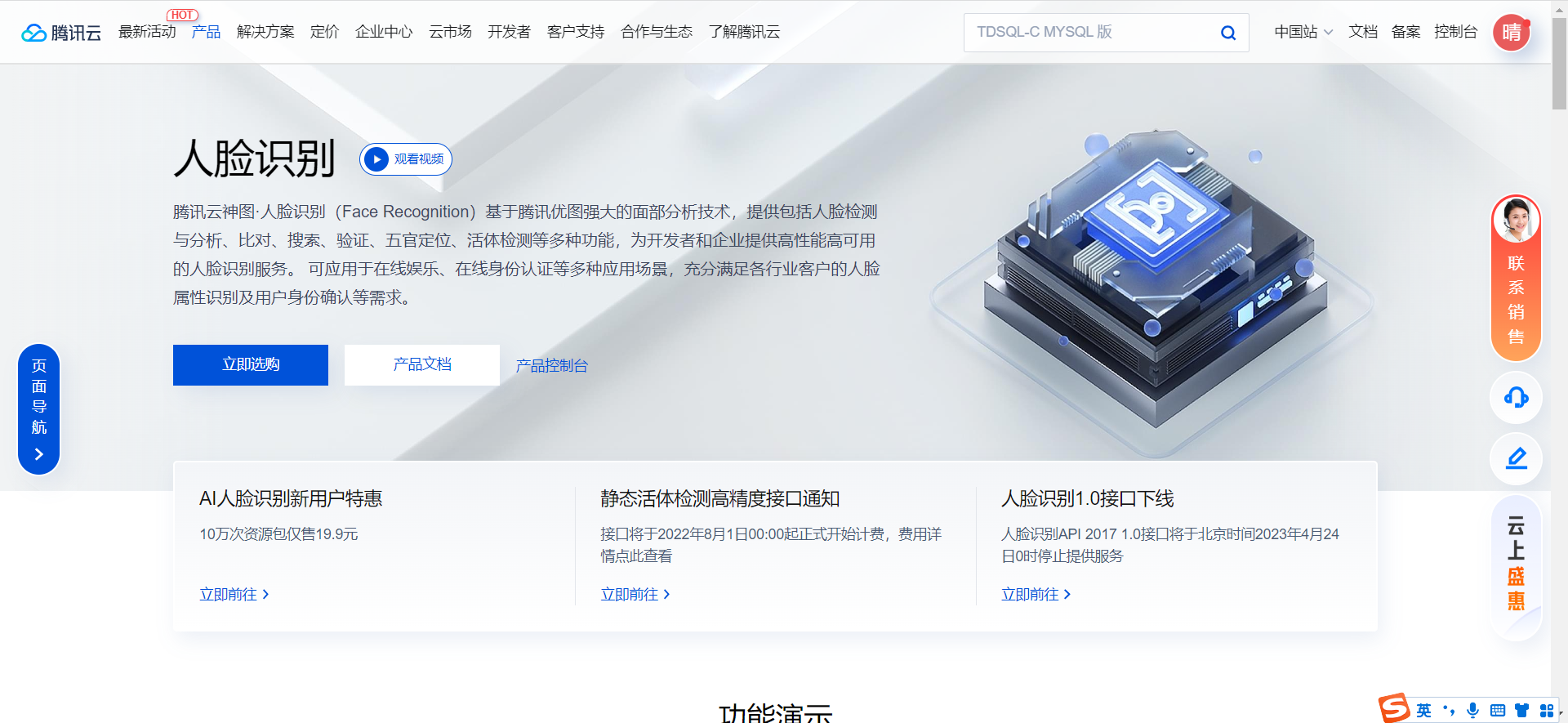
10.1、开通人脸识别
官网地址:https://cloud.tencent.com/product/facerecognition
10.2、创建人员库
为了存放移动端提交的司机面部照片,我们需要先创建人员库,名字是“代驾”,人员库的ID是“daijia-driver”。
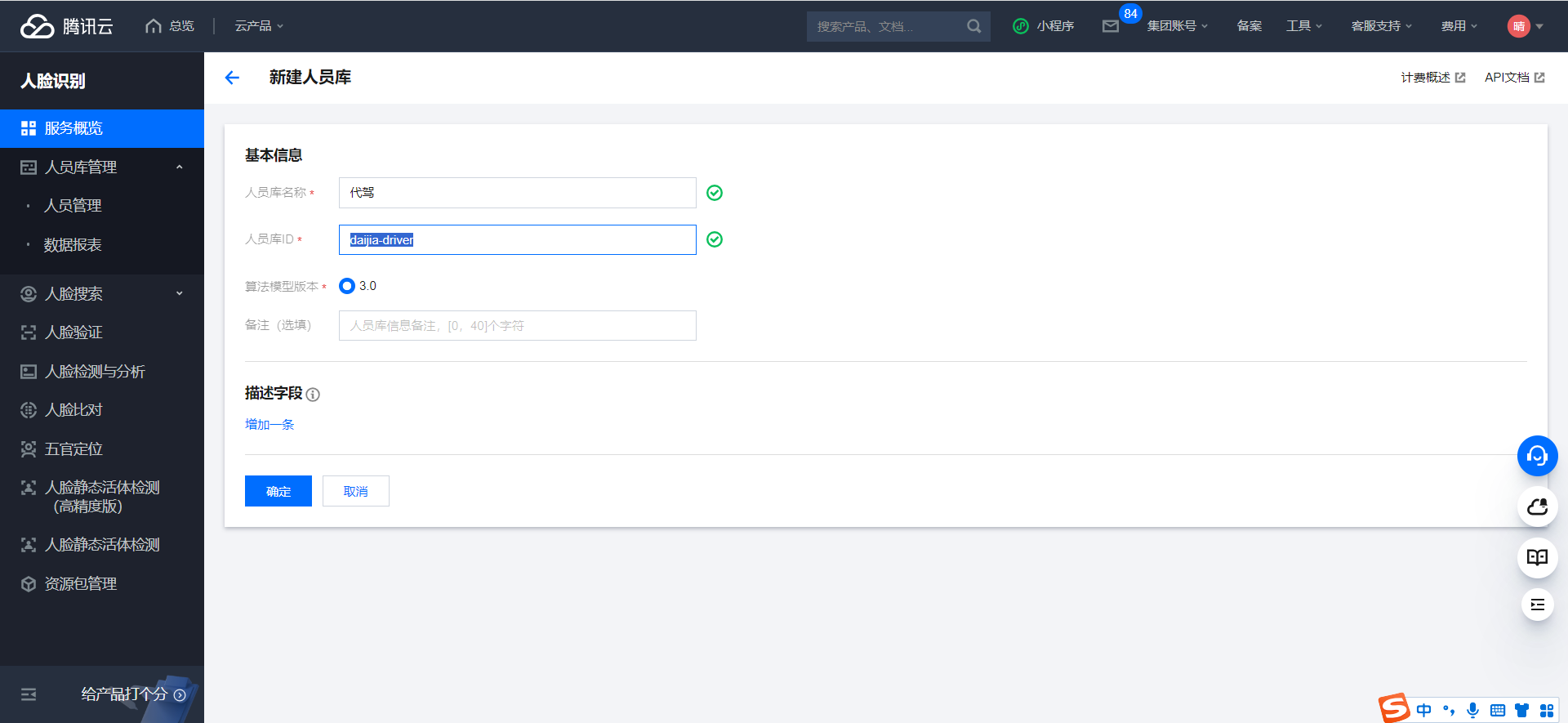
确定
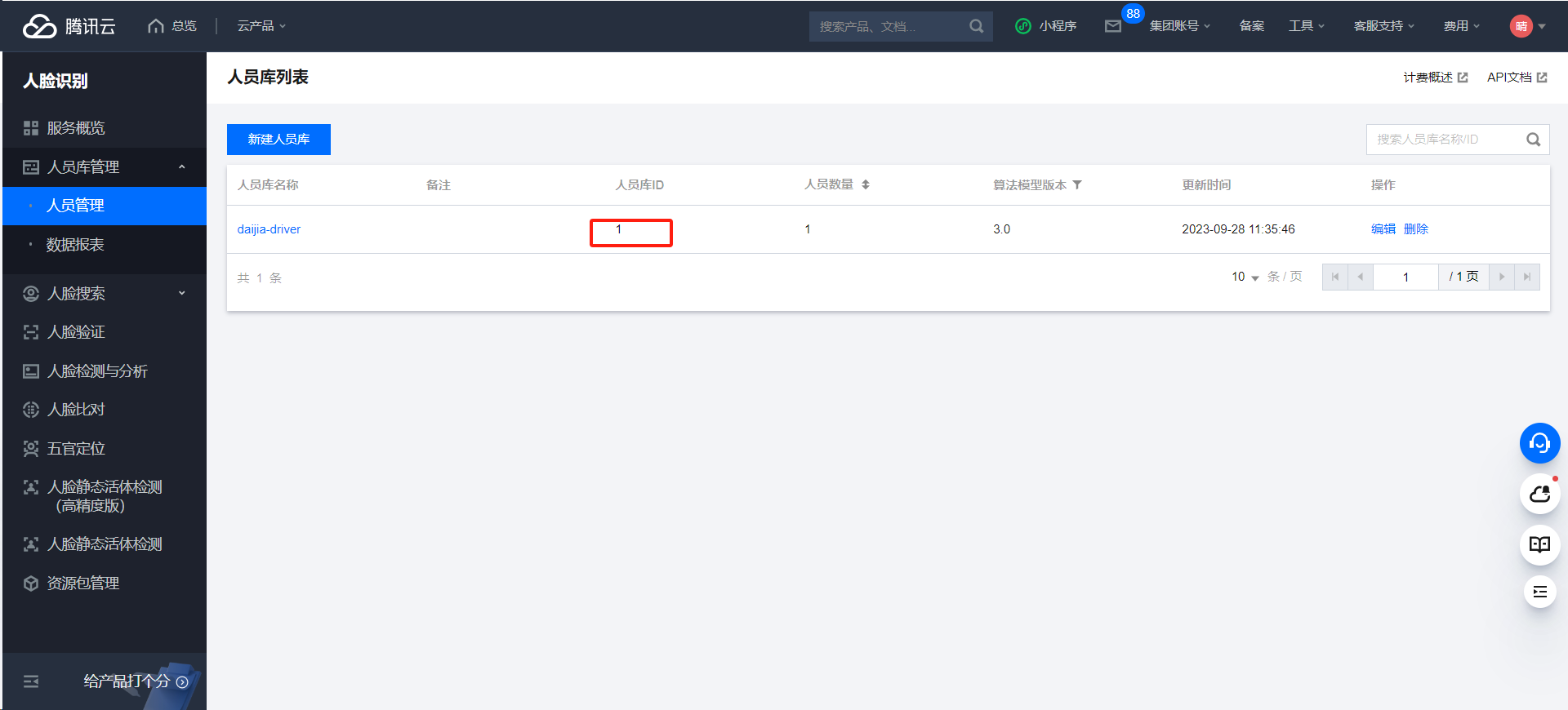
说明:人员库ID 项目里面要使用,需要配置
10.3、创建人员库人员API
文档地址:https://cloud.tencent.com/document/api/867/45014
11、创建司机人脸模型
11.1、司机微服务接口
11.1.1、common-account.yaml
将persionGroupId加入配置文件
1
2
3
4
5
| tencent:
cloud:
secretId: AKIDxjGYcR0KPFqBH8j6E7l9ICqFOO9f****
***: ***
persionGroupId: 1
|
说明:persionGroupId为上面创建的人员库id
11.1.2、TencentCloudProperties
添加配置persionGroupId属性
1
2
3
4
5
6
7
8
9
10
11
12
13
14
15
| package com.atguigu.daijia.driver.config;
import lombok.Data;
import org.springframework.boot.context.properties.ConfigurationProperties;
import org.springframework.stereotype.Component;
@Data
@Component
@ConfigurationProperties(prefix = "tencent.cloud")
public class TencentCloudProperties {
private String secretId;
***
private String persionGroupId;
}
|
11.1.3、DriverInfoController
1
2
3
4
5
| @Operation(summary = "创建司机人脸模型")
@PostMapping("/creatDriverFaceModel")
public Result<Boolean> creatDriverFaceModel(@RequestBody DriverFaceModelForm driverFaceModelForm) {
return Result.ok(driverInfoService.creatDriverFaceModel(driverFaceModelForm));
}
|
11.1.4、DriverInfoService
1
| Boolean creatDriverFaceModel(DriverFaceModelForm driverFaceModelForm);
|
11.1.5、DriverInfoServiceImpl
1
2
3
4
5
6
7
8
9
10
11
12
13
14
15
16
17
18
19
20
21
22
23
24
25
26
27
28
29
30
31
32
33
34
35
36
37
38
39
40
41
42
43
44
45
46
47
48
49
50
51
52
53
| @Autowired
private TencentCloudProperties tencentCloudProperties;
@Override
public Boolean creatDriverFaceModel(DriverFaceModelForm driverFaceModelForm) {
DriverInfo driverInfo = this.getById(driverFaceModelForm.getDriverId());
try {
Credential cred = new Credential(tencentCloudProperties.getSecretId(), tencentCloudProperties.getSecretKey());
HttpProfile httpProfile = new HttpProfile();
httpProfile.setEndpoint("iai.tencentcloudapi.com");
ClientProfile clientProfile = new ClientProfile();
clientProfile.setHttpProfile(httpProfile);
IaiClient client = new IaiClient(cred, tencentCloudProperties.getRegion(), clientProfile);
CreatePersonRequest req = new CreatePersonRequest();
req.setGroupId(tencentCloudProperties.getPersionGroupId());
req.setPersonId(String.valueOf(driverInfo.getId()));
req.setGender(Long.parseLong(driverInfo.getGender()));
req.setQualityControl(4L);
req.setUniquePersonControl(4L);
req.setPersonName(driverInfo.getName());
req.setImage(driverFaceModelForm.getImageBase64());
CreatePersonResponse resp = client.CreatePerson(req);
System.out.println(CreatePersonResponse.toJsonString(resp));
if (StringUtils.hasText(resp.getFaceId())) {
driverInfo.setFaceModelId(resp.getFaceId());
this.updateById(driverInfo);
}
} catch (TencentCloudSDKException e) {
System.out.println(e.toString());
return false;
}
return true;
}
|
11.2、Feign接口
11.2.1、DriverInfoFeignClient
1
2
3
4
5
6
7
|
@PostMapping("/driver/info/creatDriverFaceModel")
Result<Boolean> creatDriverFaceModel(@RequestBody DriverFaceModelForm driverFaceModelForm);
|
11.3、司机端web接口
11.3.1、DriverController
1
2
3
4
5
6
7
| @Operation(summary = "创建司机人脸模型")
@GuiguLogin
@PostMapping("/creatDriverFaceModel")
public Result<Boolean> creatDriverFaceModel(@RequestBody DriverFaceModelForm driverFaceModelForm) {
driverFaceModelForm.setDriverId(AuthContextHolder.getUserId());
return Result.ok(driverService.creatDriverFaceModel(driverFaceModelForm));
}
|
11.3.2、DriverService
1
| Boolean creatDriverFaceModel(DriverFaceModelForm driverFaceModelForm);
|
11.3.3、DriverServiceImpl
1
2
3
4
| @Override
public Boolean creatDriverFaceModel(DriverFaceModelForm driverFaceModelForm) {
return driverInfoFeignClient.creatDriverFaceModel(driverFaceModelForm).getData();
}
|